SEATLAYER VS 3D DIGITAL VENUE · 3D SEAT VIEWS

One chart drives the 2D map, the 3D venue and the seat view.

SeatLayer's 3D is not a separate asset bolted onto a seat map. The venue you publish once is the 3D venue: the same document carries geometry, live seat state, holds and booking, so a seat picked while orbiting the bowl is the seat in the cart, the hold and the webhook. 3D Digital Venue takes the other approach: a venue-twin visualization layer its own site describes as integrating with the ticketing system.

Discuss 3D for your venue →

Comparison boundary: these products answer different briefs. 3DDV builds venue twins and commercial sales portals around them; SeatLayer is reserved-seating infrastructure whose 3D is a progressive enhancement of its own buyer picker. SeatLayer does not claim 3D is universally better than 2D, and does not claim 3DDV lacks anything its public pages do not discuss.

ONE PUBLISHED CHART NO EXTRA 3D CREDITS REVIEWED 25 AUG 2026
ONE CHART · 2D + 3D + SEAT VIEW ILLUSTRATION
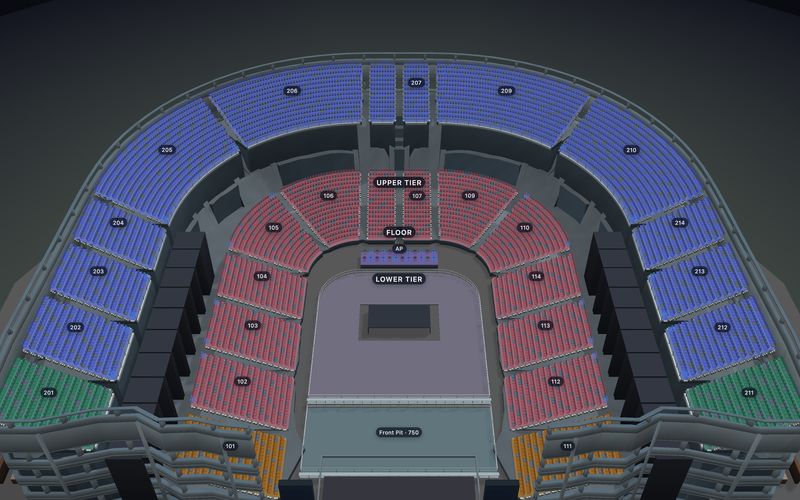
One published chart drives the 2D map, the 3D venue and the view from a seat A generic illustration of a venue bowl in three tiers around a pitch, with one seat highlighted and an amber sightline drawn from that seat to the pitch. It is a diagram, not a capture of the product. PITCH T3T2T1 SEAT VIEW 2D MAP3D VENUEVIEW FROM SEAT ONE PUBLISHED CHART · THREE SURFACES
Illustration of one published chart driving the 2D map, the 3D venue and the view from a seat. A diagram, not a product capture. The live demo below is the real thing.
Open the live 3D venue
One line to enableenable3D: true on the same picker
No 3D surchargebilled per confirmed sold seat, not per view
49 of 58 templatesopen in 3D, free to edit
Same chart, two viewsno second venue asset to maintain
THE ARCHITECTURAL DIFFERENCE

Derived from the chart, or delivered alongside it.

Almost every practical difference between these two products follows from one decision: whether the 3D venue is generated from the seating chart that sells the seats, or produced as its own asset and then connected to the system that does. SeatLayer derives the 3D venue from the same chart that draws the interactive seat map.

WHY SEATLAYER'S 3D IS DIFFERENT

The 3D venue and the inventory are the same document.

  • Author the venue once; get both views. Rows, rake, levels and orientation come from the published chart, so there is no second model to commission or keep in sync when a section is renumbered.
  • A seat picked in 3D is the seat in the cart. Selection and availability stay synchronized between Map and 3D through the same controller path, into the same hold, booking reference and signed webhook.
  • 3D costs no extra credits. SeatLayer bills per confirmed sold seat whichever view the buyer used. There is no visualization line item.
  • One line for developers. enable3D: true with seatView: true on the picker you already mounted, then setBuyerView("venue3d", { flyToSeatId }) to focus a seat.
  • 2D never stops being the complete path. When 3D is disabled, unsupported, withheld or fails, the full picker and checkout continue without it.
WHAT THE SAME CHART ALSO RUNS

3D is one view of a complete seated-event system.

  • Included for every customer. 3D and view from seat come with every account; there is no visualization project to commission.
  • Box office counter on the same live map, with best-seat suggestions, 80 mm or A4 printing, and order lookup by name, email, phone, order number or ticket code.
  • Full or partial refunds and browser door check-in.
  • Seasons and hosted checkout on the organizer's own website, at $0.50 per confirmed ticket.

How SeatLayer builds 3D: the venue is generated from the published chart, so there is no separate venue asset to model, review or maintain, and the 3D updates when the chart changes. The full evidence, including fixture hashes and claim boundaries, is on the released 3D seat map evidence page. For the category question behind all of this, see how 3D ticketing works.

WHAT THE BUYER ACTUALLY DOES

Explore the venue, choose a seat, and keep the selection.

The whole journey runs inside one picker instance. Nothing hands off to a separate viewer, and nothing loses the selection on the way back.

VENUE OVERVIEW

Enter the 3D venue from the same Map, when the device allows it.

Height, rake, levels and orientation come from the published chart. WebGL2 and the chart/device boundary decide whether 3D mounts; the Map stays complete either way.

Explore Venue Designer →
FLY TO SEAT

Focus one selected seat without leaving the selection state.

Availability and selection stay synchronized across Map and 3D, so the buyer never has to re-find a seat they already chose.

See it at stadium scale →
LOOK FROM THE SEAT

Open a clearly labelled view from that position.

Organizer-authored seat, row, floor or venue imagery is used first; every other seat gets a live 3D view from the chart, labelled as live 3D, never presented as photography.

Look out from the chosen seat →

Also comparing IOMEDIA Virtual Venue?

IOMEDIA's Virtual Venue is the other well-known name for 3D seat views; teams such as the Seahawks, Raiders and Bills publish their own Virtual Venue pages, and Ticketmaster shows it to fans. Like 3D Digital Venue, it is a custom 3D model of a specific venue. The same trade-off applies: a custom model can look closer to the real room, while SeatLayer's 3D comes from the chart you sell from, covers every venue you draw, and stays in step with live inventory. Reviewed 23 Sep 2026 from public team and Ticketmaster pages.

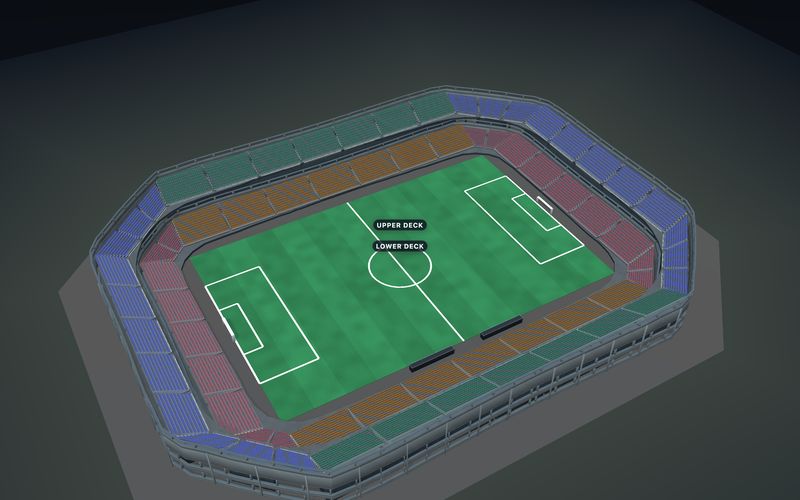
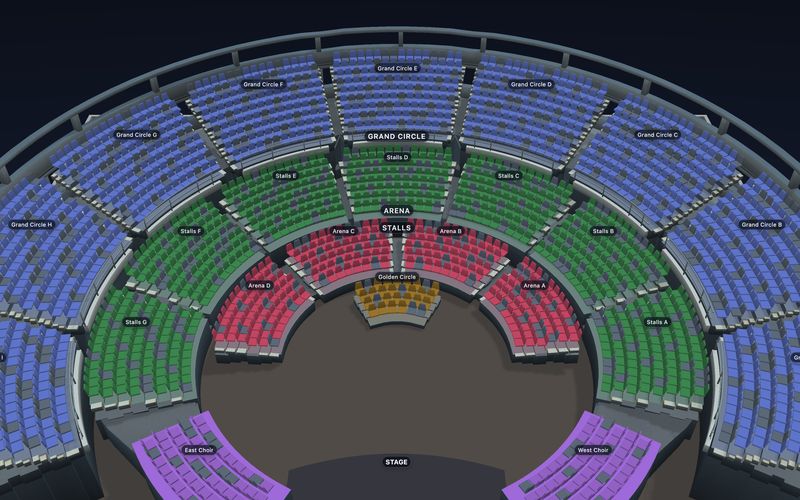
Try SeatLayer 3D now. No venue model, no project, no signup: three live venues built from published charts. Click the venue to explore it, or jump into a seat.

Loads when it scrolls into view
The Grand Theatre in 3D, before the live venue loads
Open the venue in 3D
COMPARE THE FEATURES THAT MATTER

Compare the system boundary in plain language.

SeatLayer statements reflect shipped product and published pricing. 3D Digital Venue facts were checked against its own public pages on 25 Aug 2026. Where those pages are silent, this table says so rather than asserting an absence.

Decision SeatLayer 3D Digital Venue
Primary job Reserved-seating infrastructure covering venue geometry, live seat state, holds and booking, with 3D included for every customer in its own buyer picker. Venue visualization and monetization: its site describes turning a venue into "a digital twin that sells", built by a team that makes "precise venue twins".
Where the 3D comes from Derived from the published seating chart itself, using its rows, rake, levels and orientation. One venue document, two views. Purpose-built venue twins delivered as 2D Map Selection, 3D Map Selection, 3D Seat View Visualization and VIP Hospitality Visualization.
Relationship to inventory The chart is the inventory. Selection in 3D flows through the same controller into the same hold, booking reference and signed webhook. The proprietary DVM API integrates 3D Digital Venue with the ticketing system and displays inventory availability.
Visual fidelity Chart-derived geometry with a live 3D view from every seat; organizer-uploaded photos and 360° panoramas are authoritative where present. Precise venue twins, 360º panoramic and single-seat 360º views, and 3D walkthroughs or 360° photo tours of suites, clubs and hospitality areas.
Turning 3D on One SDK flag on an existing picker: enable3D: true and seatView: true, with no separate venue asset to commission first. Integration of the DVM framework, with venue twins produced for the room. The pages reviewed publish no self-serve signup or trial.
Published pricing 100 free Platform/SDK credits every month, then $50 buys 500 confirmed-sold-seat credits at $0.10 each, falling to $0.05; no subscription, no minimum, credits never expire, and 3D adds no surcharge. Designing and test mode are free. Not published on the pages reviewed; the call to action is "Request a Demo".
Selling beyond the map Hosted checkout on the organizer's own website and gateway, a box office counter on the same live map, full or partial refunds, browser door check-in, Seasons and sales channels. The DVM API integrates the visualization with the ticketing system that owns the inventory.
Fallback behaviour The complete 2D Map is always the full path. If 3D is disabled, unsupported or fails, selection and checkout continue unchanged. Not described on the pages reviewed.
VERIFY SEATLAYER 3D

Open the released 3D yourself. No signup, no sales call.

Every link here points to SeatLayer-owned product evidence, public documentation or public source.

Commercial and source note: no price comparison is offered here because 3DDV does not publish one; its pages route to a demo request, and this page states no figure on its behalf. SeatLayer's rate is $0.10 per confirmed sold seat at the entry tier, with larger current packs reducing the unit price and 3D included at no surcharge. Full terms and the estimator are on the SeatLayer pricing and cost estimator. SeatLayer publishes no universal device, FPS, bundle-size, load-time, conversion or revenue claim for 3D, and makes no such claim about 3DDV either. Competitor facts were checked against 3D Digital Venue's own public pages on 25 Aug 2026; exact competitor URLs remain in the internal evidence record rather than as public backlinks.

WHAT IT TAKES TO SHIP 3D

Generate the 3D venue from the chart you already maintain.

The published chart supplies the 3D venue, so teams do not commission or maintain a separate venue asset. Enable it on a picker you have already mounted.

  1. 01

    Publish the venue once.

    Start from a released template or draw the room in the Designer. Rows, rake, levels and orientation are what the 3D scene is built from, so getting the chart right is the whole modeling step.

  2. 02

    Turn 3D on where it helps.

    Set enable3D: true and seatView: true on the picker. Desktops, tablets and phones with WebGL2 mount the 3D venue (up to 60,000 seats, 30,000 on phones); everything else keeps the complete 2D path with no separate code branch to maintain.

  3. 03

    Add authored imagery only where it earns its place.

    Upload seat, row, floor or venue media for the positions that matter most; those images take precedence over the live 3D view. Flat rooms stay flat, and nothing is presented as photography that is not.

Honest boundary: pointer and touch buyers can orbit the 3D scene, and keyboard users keep the Map, navigation and guided controls, but SeatLayer does not claim the orbit canvas itself is keyboard-equivalent. Reduced-motion preferences keep the decision path while limiting camera motion.

CHOOSE THE PRODUCT BOUNDARY

Choose an embedded booking flow or SeatLayer-hosted surfaces.

Both routes share venue geometry, live inventory and the same 3D. The difference is who presents checkout and operator workflows.

ADD TO YOUR PLATFORM · SDK + API

Put the seat map and its 3D inside the product you already operate.

Origin-restricted embed keys and short-lived sessions narrow browser authority. Your trusted server re-inspects the hold, prices the order, takes payment, books idempotently and reconciles signed webhooks. The seat map SDK and API reference covers credentials, packages and webhook contracts.

  • Browser: render Map or 3D, select, and return a hold identifier.
  • Server: payment, orders, tickets, refunds and customer authority.
Compare ticketing platform routes →
SELL YOUR OWN TICKETS · HOSTED

Publish the event and run the house with your own gateway account.

Connect the organizer's payment gateway keys so payment goes to its account. SeatLayer provides hosted checkout on the organizer's website with 3D included, QR and PDF tickets, full or partial refunds, a box office counter, Control Room and browser door check-in, for $0.50 per confirmed ticket.

Boundary: The organizer's connected payment gateway controls processing fees, applicable taxes, and payout timing; SeatLayer bills Hosted Ticket usage separately and is not the organizer's CRM.

Review the managed website path →

The legacy chart-preview iframe is non-transactional. Use the web SDK for your checkout, or a hosted embed for an eligible Managed event with the organizer’s connected payment gateway. Hosted Ticketing uses a separate Hosted Ticket wallet.

Sources

3D Digital Venue product site · 3D Digital Venue solutions

SEATLAYER VS 3D DIGITAL VENUE QUESTIONS

Resolve where the 3D comes from before comparing pictures.

What is 3D Digital Venue?
3D Digital Venue (3DDV) is a Barcelona-based venue visualization company. Its own site, reviewed 25 August 2026, describes turning a sports or entertainment venue into a digital twin that sells, and its team as engineers who build precise venue twins and the tools to monetize those spaces. Its published Solutions Suite covers venue mapping (2D Map Selection, 3D Map Selection, 3D Seat View Visualization and VIP Hospitality Visualization) plus web sales portals for premium, group and seat-management sales, in-game seat upgrades, a seating data viewer and immersive ads. Delivery uses its proprietary DVM (Digital Venue Maps) API.
Does SeatLayer have a 3D view from seat?
Yes, and it is core to the product rather than an add-on. The same published SeatLayer chart drives the complete 2D Map, an interactive 3D venue with orbit and fly-to-seat navigation, and a labelled view-from-seat source. Selection and availability stay synchronized between Map and 3D, so a seat chosen in 3D is the same seat that enters the hold, the cart and the booking webhook. Turning it on is one SDK flag, enable3D: true with seatView: true. It costs no extra credits, because SeatLayer bills per confirmed sold seat regardless of which view the buyer used.
What is the difference between SeatLayer 3D and 3D Digital Venue?
The difference is where the 3D comes from and what it is attached to. 3DDV's own pages describe its DVM API as integrating 3D Digital Venue with the ticketing system and displaying inventory availability: a visualization layer that sits on top of the ticketing system that owns the inventory. SeatLayer's 3D is derived from the published chart that is the inventory: the same document defines geometry, seat state, categories, holds and booking, so there is no second venue asset to commission, sync or keep in step with the seat map.
Do I need a separate 3D modeling project to use SeatLayer 3D?
No. The 3D venue is generated from the chart you already published, using its rows, rake, levels and orientation, so authoring the venue once produces both views. Every chart opens in 3D: a chart drawn without heights gets estimated tiers and stands, and flat rooms stay flat. Organizer-uploaded seat, row, floor or venue media stays authoritative for the view from seat when it exists; every other seat gets the live 3D view from the chart. SeatLayer does not claim geometry-generated 3D is photography or an exact architectural digital twin.
How does pricing compare between SeatLayer and 3D Digital Venue?
They cannot be compared line for line, because 3DDV does not publish prices: the pages reviewed 25 August 2026 route to "Request a Demo". SeatLayer publishes its rate openly: every Platform/SDK organization receives 100 free SDK seat credits each month, then $50 buys 500 confirmed-sold-seat credits at $0.10 each, falling to $0.05 at volume, with no subscription, no minimum commitment and credits that never expire. Designing charts and running in test mode are free with no time limit. 3D is included in that same per-sold-seat rate rather than being a separately priced visualization project.
Can SeatLayer sell at the box office and scan at the door too?
Yes. The same chart that draws the 3D venue runs the box office counter, which sells from the live map, suggests the best available seats, prints on 80 mm receipt paper or A4, and finds orders by name, email, phone, order number or ticket code. Organizers issue full or partial refunds through their own payment gateway, and door check-in runs in the browser. Hosted Ticketing sells on the organizer's own website at $0.50 per confirmed ticket.
JUDGE THE 3D, NOT THE CLAIM

Try seat selection in the released stadium demo.

Nothing in the demos is a render or a mock-up. Open one, fly to a seat, look out from it, and see the same seat carry through the selection state.

Discuss 3D for your venue →