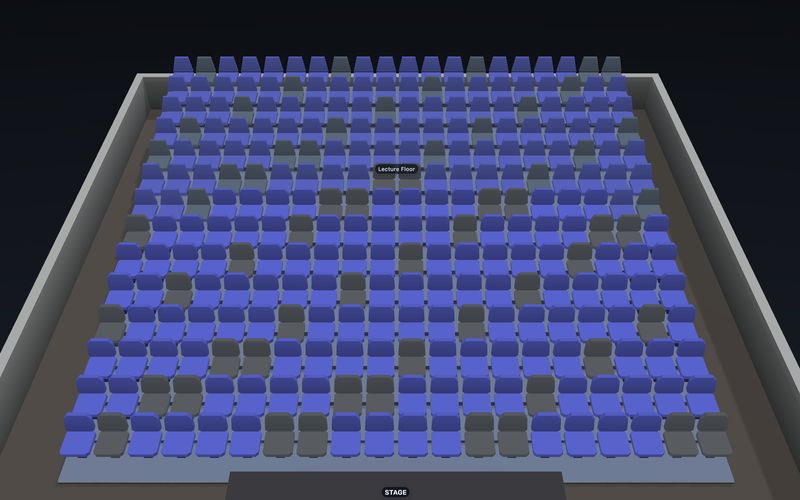
Everything SeatLayer does with a seat.

Six things, one seat map. Design the room, let buyers pick exact seats, run the event, and put it in your own product or let us host it. Everything reads the same published chart, including the interactive seat map buyers use.

The Designer: geometry, categories and labels against live validation.
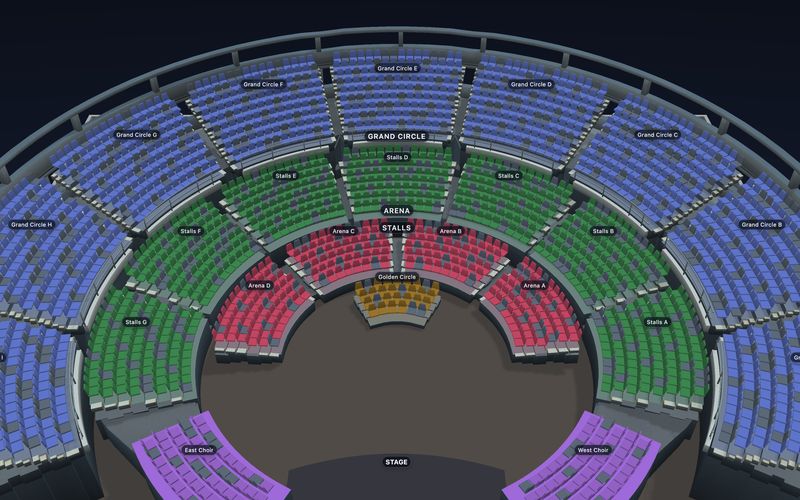
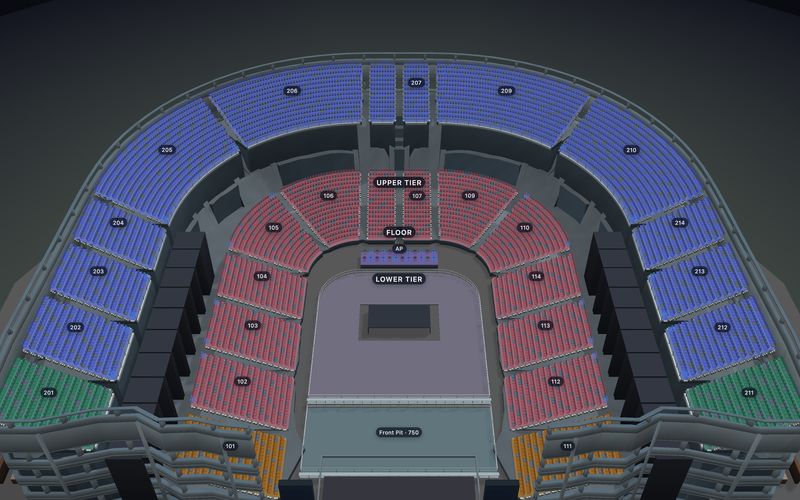
  • 200,000seats on one map, ready in 1.95 sOpen the stadium →
  • 100,000seats in a public arena you can tryOpen the arena →
  • 10,000buyers on one event, zero server errors
  • 9 msto hold a seat under that load (p99)

Tested on public venue files with simulated buyers, September 2026. How we measured loading · How we measured buyers · Every run on GitHub

What SeatLayer does.

Six areas. Pick the one you need, or scroll through them in order.

See the complete feature checklist

Design the venue

Go to Design the venue ↓

  • Straight, curved and fanned rowsReleased
  • Sections, shapes and labelsReleased
  • Round and rectangular tables, and boothsReleased
  • GA capacity areas inside a reserved-seat chart (not pure-GA events)Released
  • Accessibility seats and wheelchair baysReleased
  • Multi-floor venuesReleased
  • Categories, ticket tiers and price zonesReleased
  • Validation before you publishReleased
  • Trace a plan page or reference imageReleased
  • Import a chart that is already publicReleased

Buyers pick seats

Go to Buyers pick seats ↓

Run the event

Go to Run the event ↓

Put it in your product

Go to Put it in your product ↓

AI and agents

Go to AI and agents ↓

  • Copilot answers questions about the open chartAvailable
  • Copilot changes the open chart when you askAvailable
  • Multi-step chart creationAvailable
  • A plan or reference image as Copilot inputAvailable
  • Designer MCP for Claude and other MCP clientsAvailable
  • Opt-in buyer WebMCP for compatible browsers: read the event, find and select seats, inspect the selection, and optionally place a hold; no checkout or payment toolAvailable
  • LLM-readable docs for coding agentsReleased

Or let us host it

Go to Or let us host it ↓

  • Hosted Ticketing event pageReleased
  • Checkout on the organiser's own payment gateway, set up self-serveReleased
  • Per-seat tickets issued for the orderReleased
  • Box Office and Control Room on the same inventoryReleased

Reserved seating only: a published chart and exact-seat booking are required. GA capacity is supported only inside that reserved-seat chart; pure-GA and chartless events are not supported. Hosted Ticketing is self-serve: connect your payment gateway on the dashboard Payments page.

Two ways to use it.

Build SeatLayer into your own ticketing product, or sell your own events with Hosted Ticketing.

See how SeatLayer fits your platform

Draw the venue once.

A chart is authored in the Designer and frozen as a reviewed revision. Publishing is a separate, deliberate step, and every surface downstream reads the revision you published.

  • Rows, sections and labels: straight, curved or fanned rows with true arc geometry, named the way the house names them.
  • Tables, booths and GA capacity: round and rectangular tables, booths, and capacity zones beside reserved seats on the same chart. Pure-GA events are not supported.
  • Accessibility and multiple floors: accessible seat types that become buyer-facing filters, wheelchair bays kept distinct from seats, and stalls, circles and balconies as one venue.
  • Categories and validation: price zones painted onto the chart with per-seat overrides, and warnings raised while you work rather than after you publish.
  • Start from what exists: trace a plan page privately, or point the importer at a chart that is already public and it lands as an editable draft. See a migration run.
One chart: rows, sections and price zones, published as one revision.

Open the Designer Browse the templates

Buyers pick exact seats.

The picker renders the published chart, prices it by ticket type, finds the best available group, and hands your checkout the exact seats plus a temporary hold. A seating event is handled by one server-side state authority: competing hold requests are ordered there, so one can succeed while a conflicting request receives a conflict response.

  • Ticket types: each seat priced by the category it belongs to.
  • Best available: ask for four seats together and get them held together.
  • Temporary holds: a timer the buyer can see, released automatically if checkout is abandoned.
  • Responsive, in 37 buyer languages: the same picker manages map, selection, cart, tiers and hold timer on a phone and on a laptop.
  • Optional 3D: a view from the seat, loaded only when a buyer asks for it. See the 3D seat map.

Try it here.

Nothing on this page is a mock-up. Load the released SDK against the fixed Grand Theatre v2 fixture; the complete 2D picker mounts first, and optional 3D appears only when this browser supports it.

GRAND THEATRE · RELEASED BUYER PICKER Ready on request

Try the released picker: 2D map, then 3D from the seat.

GUIDED PROOF
Grand Theatre v2Verified fixture
2,178 seatsPublic catalog count
Released SDKSame build as production
Demo inventoryLocal to this tab

This demo runs in your browser only, and its 3D view from the seat is a labelled preview. How the demo works.

See the 3D seat map Read the SDK quickstart

Run the event on the same inventory.

Watch availability move in real time, block or release seats, sell at the counter and check people in at the door. Box Office, Control Room, blocks, releases, and door activity share event inventory.

  • Live boardOpen, held, sold and blocked seats for authorised operators, without handing over admin authority.
  • Blocks and releasesHold back house seats and put them back through guarded actions.
  • Box officeServe the walk-up audience, record the external tender, and create the real order with per-seat tickets.
  • DoorScan the ticket credential and keep check-in state separate from sale state.
  • Tickets and reportingPer-seat tickets with QR credentials, plus authorised performance totals and exports.
The event workspace: live board, availability tools and reports.

See Box Office See venue operations

Sales channels & partners

Invite partners and run every sales channel from one dashboard.

Big events rarely sell through one door. Set aside seats for sponsors, agencies, presales and the box office, invite each partner with their own login, and watch every channel sell from the same live seat map. It works whether you sell with SeatLayer or through your own checkout with the SDK.

  • Set aside exact seatsGive sponsors, agencies or members their own block of seats.
  • Invite partnersEach partner gets its own login and role, and sees only its seats.
  • Prices per audienceMember or agency prices only where they differ.
  • Private linksSend a buyer link for a presale or a group.
  • Move unsold seats liveRelease unsold partner seats to the public at a set date.
  • Report per channelEach partner sees its own sales; you see everything.

How sales channels work →

Stadium · Saturday · 60,000 seats4 channels · 1 seat map

Embed SeatLayer without replacing your checkout.

Buyers pick and hold seats in the browser, your server confirms the booking, and signed webhooks tell you when seats change. On WordPress, use the seating chart plugin.

  • Client SDKs: JavaScript and TypeScript, React, Vue 3, and Angular 17+.
  • Server SDKs: Node.js, Python, PHP, Java, Go, Ruby and .NET.
  • Any other backend: every route stays available through REST and the OpenAPI reference.
  • Signed webhooks: signed, retried, and every attempt can be replayed.
  • Embedded Designer and control panel: put the Designer and the control panel inside your own admin, so organizers draw charts and track every seat in real time. Test for free with no time limit; secret keys stay on your server.
$ npm install @seatlayer/js
import { SeatPicker } from '@seatlayer/js';
const picker = new SeatPicker({
  container: '#seat-picker',
  event: '<YOUR_EVENT_KEY>',
  publicKey: '<YOUR_PUBLIC_KEY>',
  onCheckout: (_, __, handoff) =>
    yourCheckout(handoff.holdId),
});
picker.render();
Public bootstrap, private session minting, and the origin-bound embed boundary.

Read the integration guide Read the OpenAPI reference

Ask the chart. Then tell it what to change.

AI helps in four places. Every change it makes is a draft a person reviews and publishes.

Buyer WebMCP · available

For the buyer's browser assistant

If you turn it on, a buyer's AI assistant can find seats together within a budget and select them on the map. Payment always stays with the buyer.

Inspect the buyer tools ↗
Copilot · available

In the Designer

Ask Copilot to change the open chart, or just ask questions about it. Every change is a draft you review.

See Copilot in the Designer →
Designer MCP · available

From Claude or another MCP client

Claude or another MCP client can edit one chart you allow. Publishing stays with you.

https://mcp.seatlayer.io/mcp Connect an MCP client ↗
Agent docs · released

For your coding agent

The docs are published as plain Markdown, so the agent writing your integration reads what your team reads.

Choose the right agent path ↗

Or let SeatLayer run the seated event.

SeatLayer runs the event page and checkout, takes payment through your own gateway, sends a ticket for every seat, and keeps the box office and live dashboard on the same seats. Self-serve, with Stripe, PayPal, Square, Braintree, Authorize.Net, Checkout.com, Mollie, Razorpay, Tap, Mercado Pago, Xendit, Flutterwave, Paystack and iyzico.
$0.50 per ticket25 tickets free$0 subscription

Reserved seating only: every event needs a seat map. Standing areas work inside that map.

Every feature, on a real venue.

Open any of these templates to try the Designer, the buyer map and the 3D view with nothing to set up.

Browse all 58 templates →

Questions before you choose.

Still have a question? or email hello@seatlayer.io.

Does SeatLayer replace my checkout system?
You choose. In an SDK integration, your application keeps buyer identity, checkout, payment, tax, refunds, orders, and ticket delivery. For hosted reserved-seating events, SeatLayer can provide the event page and checkout while payment runs through the organizer's own connected payment gateway. That provider controls processing fees, applicable taxes, and payout timing. SeatLayer bills Hosted Ticket charges separately. Hosted Ticketing is self-serve and supports Stripe, PayPal, Square, Braintree, Authorize.Net, Checkout.com, Mollie, Razorpay, Tap, Mercado Pago, Xendit, Flutterwave, Paystack and iyzico.
Does optional 3D replace the 2D seat map?
No. The complete 2D Map remains available. Optional 3D uses the same published chart and selection state, loads only after a visitor asks for it, and is offered when WebGL2 and the evaluated browser context support it.
How does SeatLayer handle two buyers asking for the same seat?
Every seat request for an event goes through one server-side state authority, in order, so one buyer gets the seat and the conflicting request receives a conflict response. Nothing is ever sold twice.
Can a buyer use an AI assistant to find seats?
Yes, when an integrator opts in to buyer WebMCP in a compatible browser. The assistant can read the event, find candidates, select seats, and inspect the current selection. Placing a temporary hold is a separate optional permission. There is no checkout or payment tool. Buyer WebMCP is separate from Designer MCP for authorised chart edits and the public knowledge MCP.
Which integration paths does SeatLayer support?
Transactional embedded buyer flows use the JavaScript, React, Vue, Angular, React Native, Flutter, iOS, or Android SDK. Native mobile SDKs currently support Event pickers, not Seasons. The Designer uses a short-lived, origin-scoped session inside an organizer CMS. Hosted reserved-seating event pages are a separate path for organisers who want SeatLayer to provide the buyer site and checkout. Hosted Ticketing is self-serve and supports Stripe, PayPal, Square, Braintree, Authorize.Net, Checkout.com, Mollie, Razorpay, Tap, Mercado Pago, Xendit, Flutterwave, Paystack and iyzico.
Which SDKs and languages are published?
Web: JavaScript and TypeScript, React, Vue 3, and Angular 17+. Mobile Event pickers: React Native, Flutter, Swift on iOS, and Kotlin on Android. Server: Node.js, Python, PHP, Java, Go, Ruby, and .NET. Any other backend can use the REST API and its OpenAPI reference directly.
Where are Fixed Renewable Seasons supported?
Fixed Renewable Seasons are released through browser SDKs, the REST API, and server SDK integrations. Organizer-dashboard rollout remains controlled by account, and native mobile SDKs do not support Seasons.
How is Hosted Ticketing priced?
$0.50 per confirmed ticket, and every new organization gets its first 25 tickets free. There is no subscription. Buyers pay into your own gateway: Stripe, PayPal, Square, Braintree, Authorize.Net, Checkout.com, Mollie, Razorpay, Tap, Mercado Pago, Xendit, Flutterwave, Paystack or iyzico.
Can an agent or MCP client work on my chart?
Designer MCP lets a compatible MCP client work through one authorised chart scope. The agent can read the chart and prepare changes as a revision; publishing stays a human action. The docs are also published as LLM-readable Markdown for the coding agent integrating the SDK.
Can a venue reuse one chart for multiple events?
Yes. A venue chart can be published as a reusable version, while each event adds its own pricing and seat inventory. That separates stable venue geometry from the open, held, sold, and blocked state of a particular event.
Can I try it before paying?
Yes. Test mode is free, with no time limit and no card. Platform/SDK organizations also receive 100 free credits each month. Hosted Ticketing is self-serve and supports Stripe, PayPal, Square, Braintree, Authorize.Net, Checkout.com, Mollie, Razorpay, Tap, Mercado Pago, Xendit, Flutterwave, Paystack and iyzico.

Start with the part you need.

Open the demos and try the released picker, or read the quickstart to begin an integration.

Just need a chart? The free seating chart maker needs no account.