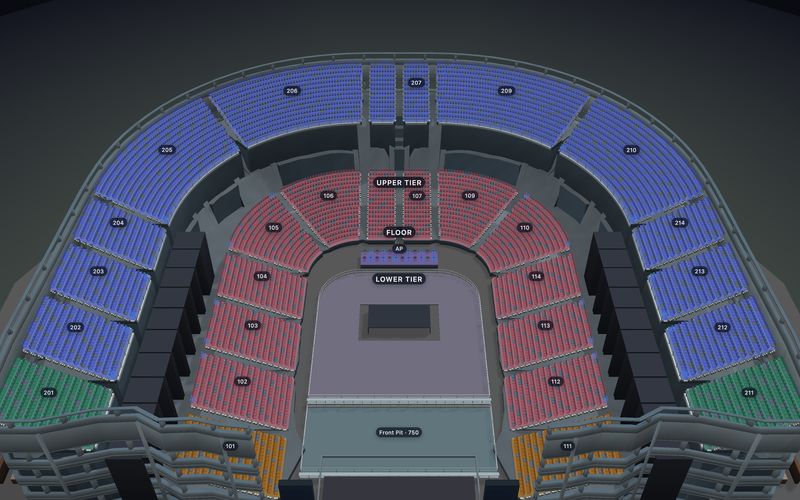
Box office software that sells from the same live map as your website.

Staff pick seats on the live map and print the ticket. A seat sold at the counter disappears from every buyer's screen at once, and the door scans the same tickets.

$0.50 a ticket, first 25 free. No subscription and no percentage. Buyers pay through your own payment gateway, one of 14 we support.

  • Best seats together
  • 80 mm roll or A4
  • Find any order
  • Counter-only staff role
Online checkout The counter The door
Counter sale

Row F · Seats 5–7 Best 3 together, Stalls

How were you paid?

CashCardComp
Student 20%
3 × $45.00
$135.00
Student 20%
−$27.00
Total
$108.00
Complete salePrint · 80 mm
Every sale, whether web, walk-up or comp, moves the same seats.

See the box office at work.

Six things counter and door staff do every show night. Pick one.

Sell the best seats in one tap.

Ask for the best seats together in a price and the map picks them. Not what the patron wants? Pick again for the next best block, or tap seats yourself.

  • Type a seat such as H12 to jump straight to it
  • Standing areas sold by quantity
  • Tables sold whole or by the chair

Record how you were paid. Apply a preset discount.

The counter never charges a card. Staff record the payment: Cash is preselected, Card means your own card machine, and admins can add methods such as bank transfer.

  • Discount presets set by an admin: a percentage or a fixed amount
  • Staff apply presets; they cannot type their own discount
  • Comps recorded with a reason, such as Press

Print on an 80 mm roll or A4.

Choose the paper once per device. Tickets print from a PDF, so any printer the browser can reach works. With an email address, the tickets go to the patron as well.

  • Every reprint is marked COPY 2, COPY 3 and logged
  • Each copy carries the same QR code, so the door admits the ticket once

Find any order in seconds.

Search by name, email, phone (four digits or more), the 8-digit order number or the code on a ticket, or scan the ticket.

  • Print again, with a count of every copy
  • Email the tickets to the same or a new address
  • Change seats and read the order history

Scan at the door with a phone.

No app to install: the scanner runs in the browser on a staff phone or tablet and reads the same live inventory as the website and the counter. Tap a result to see what staff see.

Give counter staff their own role.

The Box office role sees only the counter and the door. The server refuses anything else, so a shared counter login cannot refund, cancel or change settings.

A box office ticketing system that runs the whole sale, or just the seats

Pick who owns the money. The seats are shared either way.

Recommended

SeatLayer runs the box office

For a venue without a ticketing system it wants to keep. Online payment runs through the venue's own connected payment gateway.

Seats
SeatLayer
Orders and tickets
SeatLayer
Payment
Your gateway
Refunds
From the dashboard
  • SeatLayer creates orders and per-seat tickets, printed or emailed
  • Website, counter and door read one performance
See the hosted buyer journey →
For existing systems

Keep the point of sale you already use

Your system reads live availability, takes the money, and confirms the exact seats with a stable booking reference.

Seats
SeatLayer
Orders and tickets
Your POS
Payment
Your POS
Refunds
Your POS
  • box-book is atomic across the requested seats and idempotent on replay
  • Cancellation is not a refund: you handle the money, SeatLayer returns the seats
Read the counter-sale API →

In SDK mode the shared result is inventory only. Your point of sale stays the authority for commerce and fulfilment.

One record follows the patron to the door.

Five steps, one performance. Watch one order move through them.

  1. Put the performance on sale Date, prices, chart, and when sales open. On sale
  2. Sell online Patrons pick exact seats and pay your gateway. Seats F5–7 held
  3. Sell at the counter Best seats, a payment method, a preset discount, print. Order 48213377 · Cash
  4. Look after the order Find it, reprint, resend, change seats, or refund. Reprinted · COPY 2
  5. Work the door Scan on a phone and admit the patron. Checked in 7:04 PM

Everything after the sale, on the same house.

What a duty manager reaches for on a show night.

Control RoomFri 7:30 PM · Grand Theatre

1,864 of 2,178 seats sold 86%

  • Stalls612 / 644Open
  • Grand Circle1,020 / 1,152Open
  • Boxes18 / 246 house seats
  • Upper Circle214 / 358Closed
  1. 7:02Box office sold F5–7, cash
  2. 6:58Admin released 2 house seats in Boxes
  3. 6:41Admin closed Upper Circle

Orders and tickets

Search any order. Reprints are marked COPY 2, COPY 3 and logged; the door still admits each ticket once.

Staff role

Counter staff sell, apply presets, print and scan. Only admins cancel, refund or change the presets.

Control Room

Watch the house fill live, hold and release house seats, close a section, and read the audit trail.

Door and reporting

Scan at entry on staff phones, then export performance totals for the finance office.

  • Valid
  • Used
  • Void
  • Wrong event

Sell your own ticketsHosted Ticketing costs $0.50 per confirmed Hosted Ticket, with 25 free to start and no subscription.

Keep your own POS100 free SDK seat credits every month, then prepaid credits from 10¢ down to 5¢ per sold seat that never expire.

Compare pricing →

SeatLayer covers the reserved-seat journey from first selection to the door. SeatLayer is not a theatre CRM, membership, donor, fundraising, email-marketing, concessions, merchandise, accounting, volunteer, scheduling, or general-admission suite.

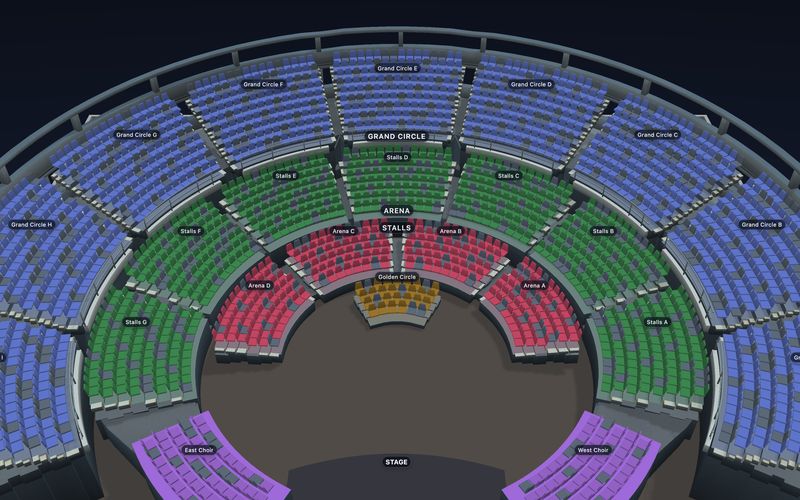
Sell at the counter from a real venue.

The box office sells from the same seat map as your website. Start from a template and both are ready at once.

Browse all 58 templates →

Questions a box office manager asks first.

Still have a question? or email hello@seatlayer.io.

Can online and box-office sales share one seating chart?
Yes. One performance holds one live house. Online checkout, the counter, active holds, house blocks and sold seats all read and write the same reserved-seat inventory, so a walk-up sale takes the seat off the buyer's screen at once. There is no second box-office allocation to reconcile.
Does the counter take card payments?
Not inside SeatLayer. Online checkout charges through the organizer's own payment gateway, connected on the dashboard and assigned to the performance. At the counter, authorized staff record cash, card already taken on the organiser's own terminal, or a complimentary sale; the SeatLayer counter does not charge the card.
Can staff print or email tickets at the counter?
Yes. A counter sale creates a real order and per-seat tickets with QR codes. Staff print on an 80 mm receipt roll or A4, chosen once per device, or email the patron. An email address is optional for a counter sale.
How do I find an order at the counter?
Type a name, email, phone number (four digits or more), the 8-digit order number or the code printed on a ticket. From the order you can reprint, resend the email, change seats, or hand it to an admin to refund or cancel.
Can box office staff refund or cancel?
No. The box office staff role can sell, find orders, print, email, change seats and scan at the door. Refunds and cancellations need an admin, and the server enforces that, not just the screen. An admin can refund in full or in part through the gateway, or cancel without a refund when the money was handled at the counter.
Can staff give discounts at the counter?
Yes, from presets an admin sets up in Settings → Box office, such as "Student 20%" or "Press (free)". A preset takes a percentage or a fixed amount; a fixed amount only applies to events in its currency. Staff see the new total before they confirm, and the preset's name prints on the ticket. A 100% preset is recorded as a comp, with its name as the reason. Staff cannot type their own discount.
Can I add my own counter payment methods?
Yes. Cash, Card and Complimentary come as standard, and an admin can add up to 12 methods, such as bank transfer or a voucher, rename them and set their order. Cash is always offered. SeatLayer records the method on the order; it never charges anyone at the counter.
Can I scan tickets at the door with a phone?
Yes. Door check-in runs in the browser on a staff phone or tablet, with no app to install. Every scan is scoped to the performance and answers valid, used, void or wrong event, and check-in stays separate from sale state so admitting a patron never changes what was sold.
Can I hold house seats or issue comps?
Yes. Authorized staff block seats for house seats, press, production or accessibility holds and release them again through guarded actions, and a blocked seat is off sale everywhere at once. A comp is recorded at the counter as a complimentary sale, so the guest still gets a real per-seat ticket.
Does it cover CRM, subscriptions or general admission?
No. SeatLayer covers reserved seats from the first selection to the door, including general admission areas on a seated chart. SeatLayer is not a theatre CRM, membership, donor, fundraising, email-marketing, concessions, accounting, volunteer, scheduling, or general-admission suite.
What box office software supports reserved seating assignments at the door?
SeatLayer does: every ticket carries its own row and seat, and door check-in reads the same live seat inventory that the counter and the online sale write to. Staff scan in the browser on a phone or tablet, and each scan is scoped to the performance and answers valid, used, void or wrong event, so the patron is admitted to the exact seat printed on the ticket. Counter sales, per-seat QR and PDF tickets, the confirmation email, refunds, Control Room and door check-in are all included in the $0.50 per confirmed ticket price, with no subscription.
Can a small venue run an on-site box office with comps and reserved seating?
Yes, and it is self-serve. The venue draws its room once, puts each performance on sale, and sells reserved seats online and at the counter from one live seat map. A comp is recorded at the counter as a complimentary sale and still issues a real per-seat ticket, and authorized staff can block and release house seats for press and production. It costs $0.50 per confirmed ticket and buyers pay through your own payment gateway, with no subscription and no platform percentage.
Open the house on one inventory.

Sell online and at the counter with your own payment gateway, or connect your existing counter to the same seats.