Venue document
Stable seat, row, section, floor, category, label, accessibility and geometry identifiers that outlive any single event.
To build a seating chart in JavaScript, render each seat as a button with a stable ID and an aria-pressed state, and keep the buyer's selection in a Set. That prototype is enough to learn from; to sell seats you then need server-owned inventory, atomic holds with expiry, real-time updates and idempotent booking. This guide covers both halves. The same steps apply whether you call the result a seating chart or an interactive seat map.
Scope: the working demo below is deliberately browser-local. It teaches interaction, not double-booking prevention.
Yes, for a prototype. Every available seat is a button with a stable ID and an aria-pressed state, a Set holds the current selection, and sold seats stay disabled. Select a few seats below, then read exactly what that demo does and does not prove.
// <button data-seat="A-1" aria-pressed="false">A1</button>
// <p id="summary" aria-live="polite"></p>
const summary = document.querySelector('#summary');
const selected = new Set();

document.querySelectorAll('[data-seat]').forEach((seat) => {
  seat.addEventListener('click', () => {
    const id = seat.dataset.seat;
    const active = !selected.has(id);

    active ? selected.add(id) : selected.delete(id);
    seat.setAttribute('aria-pressed', String(active));
    renderSummary([...selected]);
  });
});

function renderSummary(ids) {
  summary.textContent = ids.length
    ? `Selected locally: ${ids.join(', ')}`
    : 'No seats selected.';
}
That selected set is buyer intent, not inventory. Nothing here reserves a seat, so never label a locally selected seat as reserved. Everything above it is progressive enhancement: the markup ships as plain buttons, JavaScript upgrades them, and a reader without JavaScript still sees the seat labels, the sold states and the rest of this guide.
Keep the same contract: one button per seat, a stable id, aria-pressed for the selected state, and the selection in a Set. Hold that Set in useState and replace it on every toggle so React sees a new reference. Mutating the existing Set will not re-render. This component is the React equivalent of the vanilla snippet: it renders seats and tracks intent, nothing more. It still has no inventory, no hold and no expiry, so two browsers can each "select" seat C-3.
import { useState } from 'react';

export function SeatingChart({ seats }) {
  const [selected, setSelected] = useState(new Set());

  const toggle = (id) => setSelected((prev) => {
    const next = new Set(prev);
    next.has(id) ? next.delete(id) : next.add(id);
    return next;
  });

  return seats.map((seat) => (
    <button key={seat.id} type="button" disabled={seat.sold}
      aria-pressed={selected.has(seat.id)}
      onClick={() => toggle(seat.id)}>{seat.label}</button>
  ));
}A renderer solves pixels, hit testing and navigation. It never decides who owns a seat when buyers compete. Choose by interaction cost and by how much accessibility work you are willing to rebuild. Whatever you pick, the accessible name, the focus order and the selected state have to survive it.
| Layer | Useful when | Work you still own |
|---|---|---|
| DOM buttons | Small maps, direct semantics, simple layouts | Spatial navigation, dense-scene performance, venue geometry |
| SVG | Vector geometry, labels, inspectable seat nodes | Pan/zoom, large node counts, semantic focus model |
| Canvas | Dense 2D scenes and custom hit testing | Accessible equivalent, focus, text, selection semantics |
| WebGL | Very dense or spatially rich scenes | Rendering pipeline, picking, fallbacks, accessibility, device variance |
Primary implementation references reviewed 10 Aug 2026: Konva's React canvas reservation example, an open React/Konva seating editor, and the package documentation surfaced for react-seat-charts, seat-picker, and @seatsio/seatsio-react. Package status and APIs can change; confirm them at evaluation time.
The browser can request a change. Only an authoritative backend can decide whether that transition succeeds. Six systems sit around the renderer. Miss one and the failure is not cosmetic: a seat sold twice, a hold that never releases, or an order your server cannot prove it was allowed to take.
Stable seat, row, section, floor, category, label, accessibility and geometry identifiers that outlive any single event.
Free, held, booked, blocked and released state owned outside the browser.
One decision point for competing requests, and temporary ownership that ends predictably without relying on an open tab.
Each buyer begins with a snapshot and applies later inventory deltas.
Your server reads fresh held items, applies pricing and payment, and confirms with a stable booking reference so a retry is safe.
Signed webhooks, history and reports, plus staff controls, blocked seats, accessibility filters and scoped authorization.
Not in the browser. A client may optimistically highlight a seat, but the durable transition belongs to one server-side state owner: selection requests an atomic hold, exactly one request wins, and every other client is told. Design the browser for the conflict response and not only the happy path: take the lost seat out of the map, keep the rest of the selection intact, and let the buyer carry on choosing.
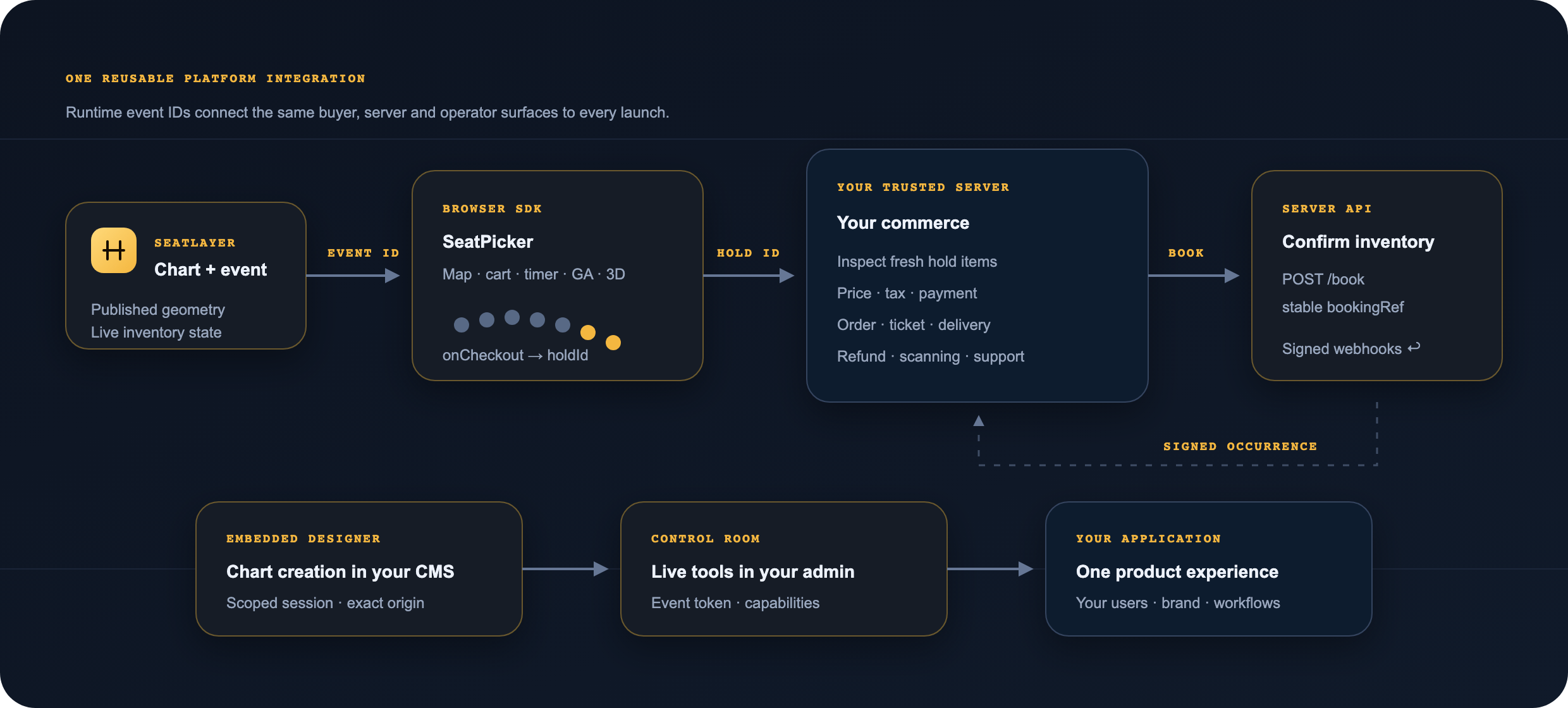
The diagram explains the contract, not a universal throughput claim. SeatLayer's released evidence includes one scoped 30-way race for one contested seat: one hold succeeded and the other requests received conflicts.
Build the parts that differentiate your product. DIY is a fair choice when the scope stays narrow; evaluate a maintained seating layer when seating itself is becoming a programme. The honest test is whether the seat map is the thing your customers pay for, or the thing standing between them and what they pay for.
For a public event, SeatPicker uses event and a publishable publicKey to load chart plus live inventory directly from SeatLayer; your backend is not part of that first chart load. The picker hands your server an opaque holdId only at checkout. Your server inspects fresh held items, applies pricing and payment, and confirms inventory with a stable booking reference. A private buyer flow supplies a token provider instead of publicKey. The React seating chart tutorial walks the same flow end to end.
npm install @seatlayer/js

import { SeatPicker } from '@seatlayer/js';

const picker = new SeatPicker({
  container: '#seat-picker',
  event: '<YOUR_EVENT_KEY>',
  publicKey: '<YOUR_PUBLIC_KEY>',
  onCheckout: async (_, __, handoff) => {
    await fetch('/api/checkout', {
      method: 'POST',
      body: JSON.stringify({ holdId: handoff.holdId }),
    });
  },
});

picker.render();Use the complete picker or the headless chart. Server SDKs and REST/OpenAPI cover the trusted side.
Production can start at $0: each Platform/SDK organization receives 100 free confirmed sold-seat credits per month. Paid packs start at $0.10 per sold seat, purchased credits never expire, and there is no standard subscription commitment.
Review the developer platformFollow the JavaScript seat map SDK installation guide or the seat booking quickstart. You can also inspect the JavaScript SDK source on GitHub and @seatlayer/js on npm.
Create test credentials and run one event through render, hold, trusted inspection, booking and signed webhook verification. To inspect first, open the released buyer demo.